
Learning, Certifying, and Climbing the IT Ladder
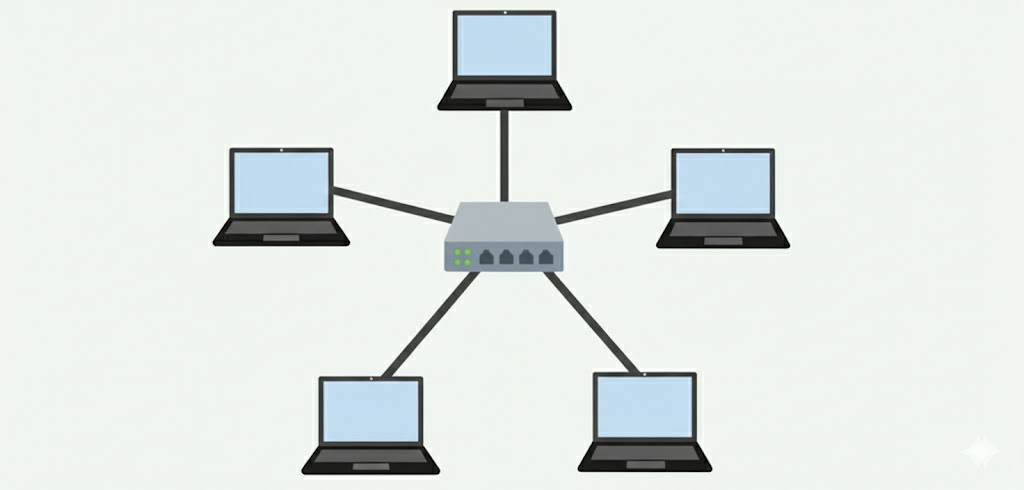
A network topology is simply the layout, or shape, that devices form when they're connected together. It describes how the cables and connections are physically or logically arranged, and understanding these layouts helps explain why some networks are easy to expand, why some are more resilient to failure, and why a single unplugged cable can sometimes take down an entire office. There are several common topologies you'll run into as you study networking, each with its own tradeoffs.
The star topology is by far the most common layout in modern SOHO and enterprise networks, and it's the one you already have at home. In a star topology, every device connects individually to a central point, usually a switch or router, rather than to each other directly. This central device relays all the traffic between the connected devices. The biggest advantage is reliability: if one cable or device fails, only that device loses connectivity, while the rest of the network keeps running fine. The tradeoff is that the whole network depends on that central device, so if the switch itself fails, everything connected to it goes down.
A bus topology connects every device along a single shared cable, often called the backbone. Data sent by any device travels down this shared line and is picked up by the intended recipient. Bus topologies were common in early Ethernet networks because they required very little cabling, which made them cheap and simple to set up. However, they don't scale well and are fragile, since a break anywhere along the backbone cable can bring down communication for every device attached to it. For this reason, bus topologies have largely been phased out in favor of star layouts.
In a ring topology, each device connects to exactly two neighboring devices, forming a closed loop. Data travels around the ring in one direction (or sometimes both, in a dual-ring setup) until it reaches its destination. Ring topologies were popular in older technologies like Token Ring networks because they handle predictable, evenly distributed traffic well. The downside is similar to bus topologies: a single broken connection can disrupt the entire ring, unless the network includes a secondary path to route around the failure.
A mesh topology connects devices to multiple other devices rather than just one central point. In a full mesh, every device connects directly to every other device, creating a huge number of redundant paths for data to travel. This makes mesh networks extremely resilient, since traffic can simply reroute around a failed link or device. The tradeoff is cost and complexity: full mesh networks require significantly more cabling and configuration, which is why partial mesh designs, where only some devices have multiple connections, are far more common in practice, especially in large enterprise backbones and modern mesh Wi-Fi systems.